
MyUninstaller
1.77
Size: 52 MB
Downloads: 7562
Platform: Windows (All Versions)

Before removing an installed program, you may want to know a few details about it, but the standard Windows Uninstaller fails to provide them. If you want more information about a program, like its installation directory or its location in the registry, then you should try MyUninstaller. This lightweight application can easily replace the Windows Add/Remove Program applet, due to its enhanced functionality, as well as the large amount of information it provides for individual programs.
MyUninstaller is completely free and it is compatible with numerous Windows platforms, from the old and dusty Windows 98 to the new and shiny Windows 7. The application's executable comes in a ZIP archive, which is only 45 KB. You can extract the executable and run the application right away, without going through an installation process.
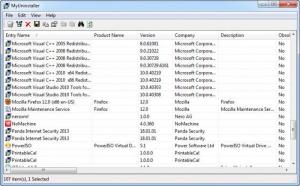
MyUninstaller displays all installed programs in a list, on a clean and efficient user interface. Each program is displayed with a wide range of information, like product name, version, website, installation folder, its corresponding registry key, if it is a system component or not and more. If you don't want to scroll horizontally, to see all columns, you can bring up a properties window, for individual programs, on which you can find the same information.
The application's functionality is not limited to uninstalling programs. Information about one or more programs can be copied to the clipboard or exported in plain text format. Furthermore, the software allows you to generate HTML reports with all or selected programs. It is also possible to filter all entries, to show or hide programs which don't have an uninstaller, system components, 64-bit installations and other program types.
It should be fairly obvious that a program can be uninstalled just by selecting its entry and clicking a button. Additionally, you can delete a program's uninstall entry or change its installation.
Pros
MyUninstaller displays a wide range of information about individual programs. It allows you to copy and export the information and generate HTML reports. Besides uninstalling a program, you can also remove its uninstall entry and change its installation.

Cons
A feature for removing a program along with its leftovers would be a welcome addition. MyUninstaller provides you with any information you need about your installed programs, so you can know exactly what you are about to uninstall.

MyUninstaller
1.77
Download
MyUninstaller Awards

MyUninstaller Editor’s Review Rating
MyUninstaller has been reviewed by Frederick Barton on 13 Nov 2013. Based on the user interface, features and complexity, Findmysoft has rated MyUninstaller 4 out of 5 stars, naming it Excellent







